
Using AI to Discover, Validate, and Analyze Public SDoH Data
If your project involves public data, you have probably spent more time data wrangling than performing analysis or building models. This is especially true when data is derived from multiple public sources or must be integrated with your own datasets. There is no single standard for public SDoH data, and datasets often differ in definitions, geographic levels, identifiers, and reporting periods. As a result, analysts spend significant time determining whether datasets can be combined before statistical analysis or machine learning can begin.
This article shows how an AI assistant can reduce much of the exploratory work involved in discovering and modeling of public SDoH data. An open-source AI assistant will be highlighted that integrates several of the most widely used public data sources. The assistant can help find relevant variables, understand geographic and temporal coverage, and compare related measures across sources before building statistical, machine learning, or AI pipelines.
The Challenge of Public SDoH Data
Government agencies and civil organizations collect, consolidate, and publish Social Determinants of Health (SDoH) data. Important U.S. sources include the U.S. Census Bureau, the Centers for Disease Control and Prevention (CDC), and the Centers for Medicare & Medicaid Services (CMS). Important international sources include the World Health Organization (WHO) and the United Nations Statistics Division.
Accessing data from different sources can be time-consuming because there is no common API for querying and retrieving SDoH data. Also, there is no standard approach for organizing datasets. Each source uses its own terminology, metadata conventions, and geographic identifiers.
Also, combining sources for analysis can be challenging. Most public health datasets can be understood in terms of three types of data: time, place, and population metrics.
Time
Most public SDoH metrics are reported annually, but reporting periods are not always consistent across sources. Reporting lags are also common, particularly for mortality and healthcare claims data.
Place
Geography is often the most difficult challenge in public SDoH analytics. Data may be reported at the country, state, county, census tract, ZIP code, or census block group level. Healthcare outcomes may also be reported by facility, service area, or hospital referral region rather than a traditional geographic boundary.
Even when geographic areas are similar, different identifier systems such as GEOIDs, FIPS codes, ZIP codes, and facility identifiers can make integration difficult. You can spend significant effort determining whether two datasets can be joined at a geographic level.
Population Metrics
Population metrics are typically expressed as counts, percentages, rates, or prevalence measures. Converting counts into meaningful rates requires accurate population denominators, which may come from different sources and time periods.
To determine the exact geographic coverage and time frames for a metric, you often need to query and test the data. Metadata cannot always be relied upon because descriptions may be incomplete or provided only at a high level. In addition, datasets may contain missing values requiring you to evaluate patterns of missingness.
Additional complexity arises from age-adjusted rates and survey weighting. Two sources may provide a metric called “mortality rate,” but one may report crude mortality and the other age-adjusted mortality. Without understanding the methodology, you might incorrectly compare or combine the data. Understanding the specific source of each metric is important for determining how the metric was calculated.
Finding the best source for your metric can be difficult as numerous sources can define similar metrics and the metrics can vary by place and time. Often you will need to determine whether two metrics can be compared, cover the same geography, and are available for the same time period.
Public Repositories Help—but Have Limits
Public repositories are being developed that integrate multiple data sources. Examples of repositories that integrate SDoH data are Google’s Data Commons and the Agency for Healthcare Research and Quality (AHRQ).
Repository initiatives address some of the challenges of analyzing public SDoH data. Dimensions and metrics are organized into a common data structure with consistent naming, units, and documentation. Repositories also help with “places” issues by using consistent identifiers such as FIPS codes and GEOIDs. Data querying and access are also standardized.
Repository initiatives help with public data, but they do not eliminate the work of exploratory data modeling and validation. A repository may lag behind the latest source release, provide only aggregate summaries rather than detailed data, and metadata descriptions can be incomplete or overstate availability by time and place.
Data integration does not guarantee that two metrics can be compared as-is. Suppose you join CDC PLACES county diabetes prevalence with an ACS county poverty rate for the same state and year. Both may list county FIPS codes and appear to merge, yet one source may contain missing values, while each rate uses a different denominator and population definition.
Repository initiatives solve a number of issues, but you still need tools capable of dynamically exploring and validating datasets. That is especially true when analysis depends on joining multiple sources or combining public repositories with local proprietary data.
Analytic Assistants
Conversational AI agents that orchestrate data tools are well suited to data integration and data exploration tasks. A large language model interprets your goal and selects a sequence of steps: search catalogs, call APIs, align identifiers, inspect returned values, and run statistics or maps. The model does not replace judgment, but it can carry out the repetitive integration and validation steps that otherwise slow SDoH projects.
For example, you might ask: “For Ohio counties in 2023, find measures of social isolation and unemployment, check that both are available at the county level, and calculate their Pearson correlation.” An assistant can search several sources for metrics, note the original source and description of the metrics, fetch values by county FIPS code, drop rows with missing data, compute the correlation, and return a table plus a scatter plot.
The open-source project: SDoH Public Data Assistant is a chat application that helps you explore and analyze public data repositories relevant to SDoH. You ask questions in natural language; a reasoning agent interprets them, discovers indicators across connected sources and fetches observations for places and time periods. It can run statistical analyses, including correlation, regression, and simple forecasts. It can also produce charts and maps from the results. The assistant connects to Google Data Commons, Centers for Medicare & Medicaid Services (CMS) datasets, and CDC PLACES.
The assistant searches three repositories in order, then merges results so no single source dominates the list. Google Data Commons is queried first. It offers the broadest coverage of demographic, economic, and health variables in a consistent structure. Centers for Medicare & Medicaid Services (CMS) datasets add claims and program[-]based health metrics. CMS measures describe the Medicare population (age 65 and older), so they should not be compared to general-population rates. CDC PLACES supplies estimates of chronic disease, health behaviors, disabilities, and health-related social needs. PLACES is often the best source when Data Commons lacks a series, when the question concerns HRSN topics, or when age-adjusted county prevalence is needed for comparison.
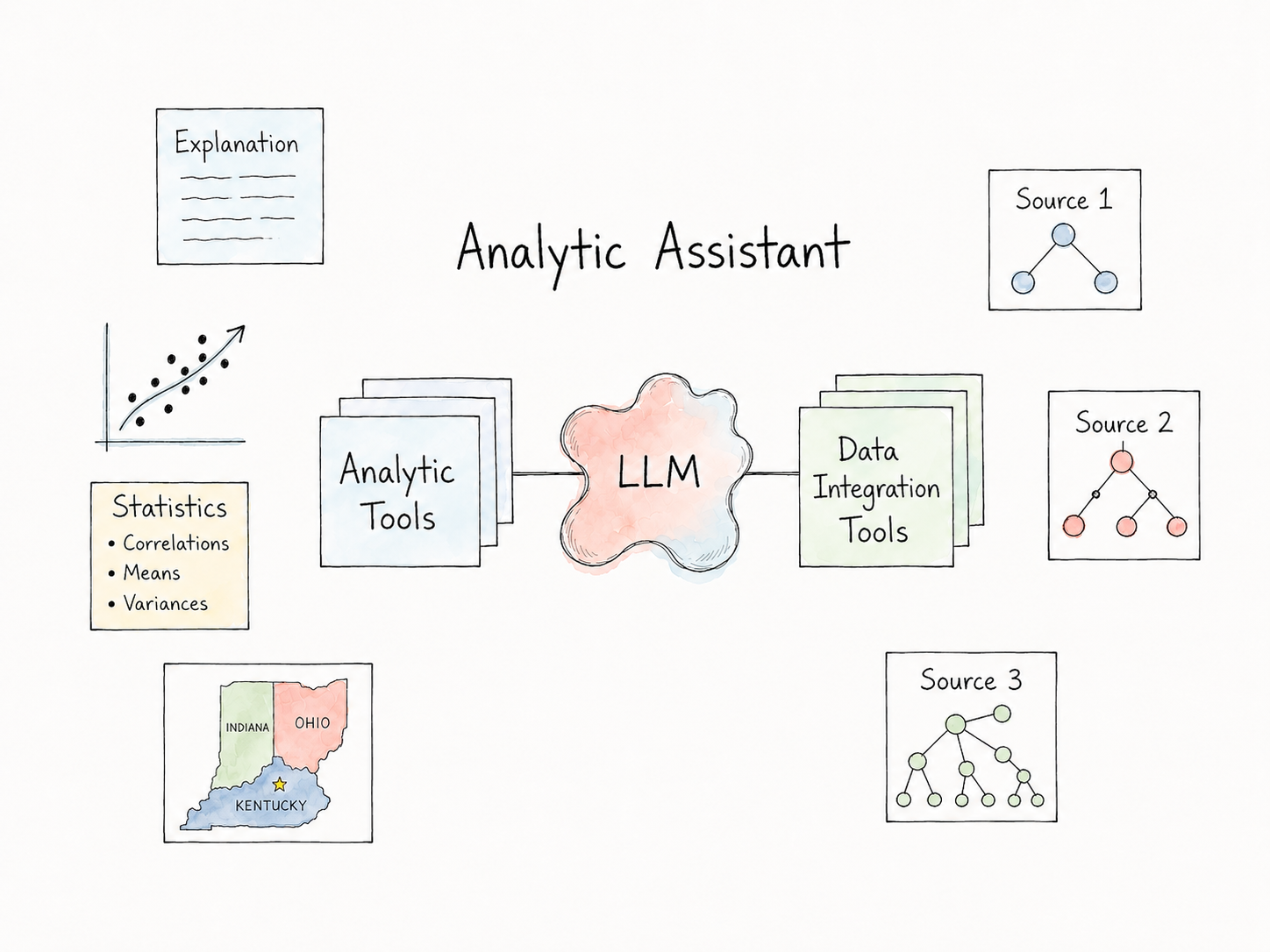
The assistant helps you
- Normalize terminology across sources Map requests (“diabetes rate,” “poverty,” “loneliness”) to repository-specific indicator names and IDs, and flag when two similar measures use different definitions or populations.
- Query heterogeneous sources Reach Data Commons, CMS, CDC PLACES using different [APIs].
- Discover variables Search across sources for candidates that match a topic, geography, and time scope.
- Describe variables from metadata — Summarize source, repository, geographic level, and measurement type.
- Join variables on shared time and place — Build tables with one row per place and time. Confirm that two indicators are available at the same level (for example, county-to-county) before merging or mapping.
- Inspect live samples Pull actual observations to see which places have values, which years are populated, where data are sparse, and whether reporting periods align across sources.
- Generate statistics and visualizations Run descriptive statistics, correlation, regression, or simple forecasts on assembled tables, and produce standard analytic views such as scatter plots and choropleth maps.
To illustrate the workflow, let’s examine a social factors and public health question. We would like to study the relationship between diabetes and poverty across Indiana counties. Studies show that socioeconomic status is a significant predictor of diabetes and mortality (see [Socioeconomic inequalities in mortality, morbidity and diabetes management for adults with type 1 diabetes] (https://pubmed.ncbi.nlm.nih.gov/28489876/)[).]
Step 1: Start Assistant Session
A new session can be started by entering:
localhost:8052in a browser.
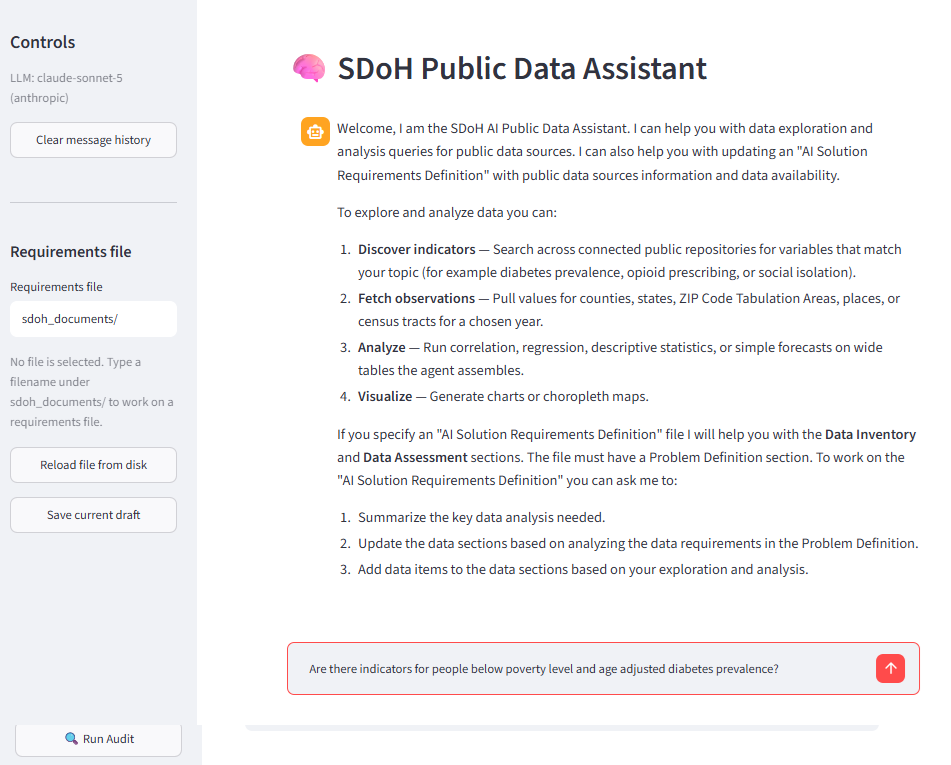
The assistant provides an overview of its capabilities for data exploration and analysis of public data sources. You can also document data items in an “AI Solution Requirements Definition” file. Using controls on the left you specify the name of the file and the assistant will help you with the Data Inventory and Data Assessment sections. The file must have a Problem Definition section. If you need help, you can always ask the assistant. For example, “What should the Problem Definition section document?”.
Step 2: Find Indicators
We use the assistant chat page to ask “Are there indicators for people below poverty level and age adjusted diabetes prevalence?”
The assistant searches the sources and uses source metadata to respond with a number of candidate indicators (not shown in the image above). Note that tools are provided to view the logic steps used to complete the request, and to audit the response using a separate LLM. The indicators that look like the best candidates are:
| Metric | Source | Repository | Metric Source | Indicator ID |
|---|---|---|---|---|
| Population Below Poverty Level in Past Year |
Data Commons | Data Commons | Census ACS 5-Year Survey | datacommons:Count_Person_BelowPovertyLevelInThePast12Months |
| Diagnosed Diabetes Among Adults (Age-adjusted Prevalence) |
CDC PLACES | CDC PLACES | BRFSS (CDC PLACES model-based) |
cdcplaces:county/DIABETES/AgeAdjPrv |
Step 3: Verify Place and Time
We would like to study the indicators at the county level for 2023 so we ask the assistant:
Are datacommons:Count_Person_BelowPovertyLevelInThePast12Months and cdcplaces:county/DIABETES/AgeAdjPrv available at the county level for Indiana and in the year 2023?
The assistant queries the sources to determine if data is available for this time and place and responds that they are available.
Step 4: Explore the Data
We can use the assistant to explore these indicators. For example:
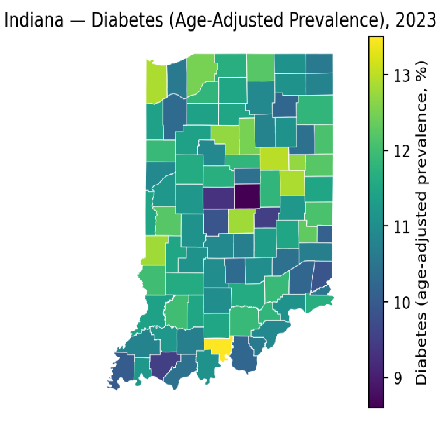
Show a map of counties in Indiana for cdcplaces:county/DIABETES/AgeAdjPrv in the year 2023.This query provides a choropleth map with a legend. Data Commons is used to find the polygon shapes to represent counties.
Step 5: Reconcile the Indicators
We would like to compare the indicators but note that the populations are different as the poverty count is based on an entire population and diabetes is based on adults. But it is common practice in public health research to make such comparisons as poverty is treated as a characteristic of the place rather than a characteristic of the individuals with diabetes. Age-based poverty indicators are rarely available.
Also, we can’t compare the indicators as one is a count and one is a rate so we need a population count to calculate Population Below Poverty Level in Past Year as a percent. We ask the assistant:
Is there a population count at the county level in 2023 based on the Census?The assistant responds with a number of indicators and we choose datacommons:Count_Person which we can use to calculate poverty as a percent.
Step 6: Analyze the Relationship
To visualize the correlation of the indicators we ask the assistant:
Provide a scatter plot diagram for the observations:

(datacommons:Count\_Person\_BelowPovertyLevelInThePast12Months / datacommons:Count_Person)
and
cdcplaces:county/DIABETES/AgeAdjPrv

for the counties in Indiana in the year 2023.
The assistant queries the sources, joins the data on common counties and produces a scatter plot showing the correlation.
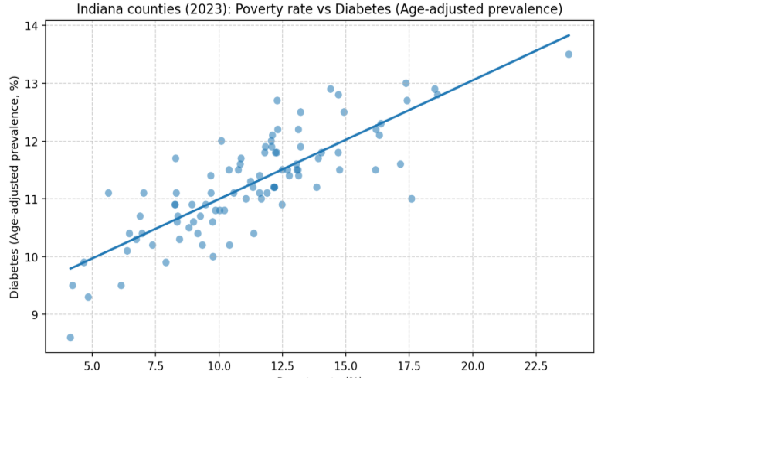
Using the question above we could ask for the Pearson Correlation Coefficient. The assistant responds with:
- Pearson correlation result (requested)
- Pearson correlation (r) between
poverty_fractionandcdcplaces:county/DIABETES/AgeAdjPrv(Indiana counties, 2023): 0.8154 - p-value: 0.0000 (rounded; effectively p < 0.0001)
- Interpretation This is a strong positive cross-county association in Indiana for 2023: counties with a higher share of people below the poverty level tend to have higher age-adjusted diagnosed diabetes prevalence among adults (CDC PLACES).
Usage Considerations
AI analytic assistants are a new class of tools and should be used with the same care as any analytic software.
The assistant uses a large language model (LLM) to orchestrate queries, statistical functions, and visualization tools. Like any LLM, it can misunderstand a request or select the wrong indicator if a prompt is ambiguous. To reduce this risk, the assistant is restricted to the configured data repositories and cannot search the Internet. It is also instructed to generate results only from sources rather than fabricate values.
Many repositories contain indicators with similar names and descriptions. When possible, refer to indicators by their indicator IDs rather than by name. If you use names or descriptions, ask the assistant to state the source, indicator name, and indicator ID so you can verify that the correct indicator was selected.
Each prompt should be self-contained. The assistant does not rely on information from previous prompts, so include the required place, time period, indicators, and analysis request in every query.
When you are uncertain about a result, use the Run Audit button. The Audit LLM independently reviews the response, including the reasoning steps, selected indicators, and supporting evidence from the data sources.
Conclusion
Analysis of public SDoH data remains challenging because sources differ in definitions, geographic levels, identifiers, and reporting periods. Public repositories provide more integration, but projects still require joining repository data with measures from other sources and verifying geographic and temporal coverage in live samples. The Indiana example in this article is typical: finding suitable indicators and turning a research question into a joined table, a map, and a correlation required checking availability by county and year, reconciling a count with a rate, and interpreting populations that do not align perfectly.
Assistants such as the SDoH Public Data Assistant help with exploratory work by searching across APIs, validating samples, assembling tables, and producing maps and statistics from natural-language requests. They can shorten the data-wrangling phase and leave more time to determine whether a comparison is meaningful and what it implies for analysis or policy.
If this approach fits your work, try the SDoH Public Data Assistant and send ideas, comments, and suggestions.
No responses yet